
You have one lane and one job: tap when your runner crosses the line. Not the winner, not the field, not whoever looks closest. Your lane.
This is the position most meets staff most heavily, because it is the one that grows with the number of lanes: six lanes means six people and six devices. It is also the quickest position to pick up.
Setting up
Join the meet in the Finish Line role and say which lane you are on. That is what sends the right athlete to your screen, so it is worth double-checking before the first heat.
Stand at the line, not before it or past it. A device held ten meters down the track from the finish is wrong on every heat, in the same direction, and nothing later on can spot it or fix it.
The rhythm of a heat
Every heat runs the same loop. Once you have done it twice you will not think about it again.
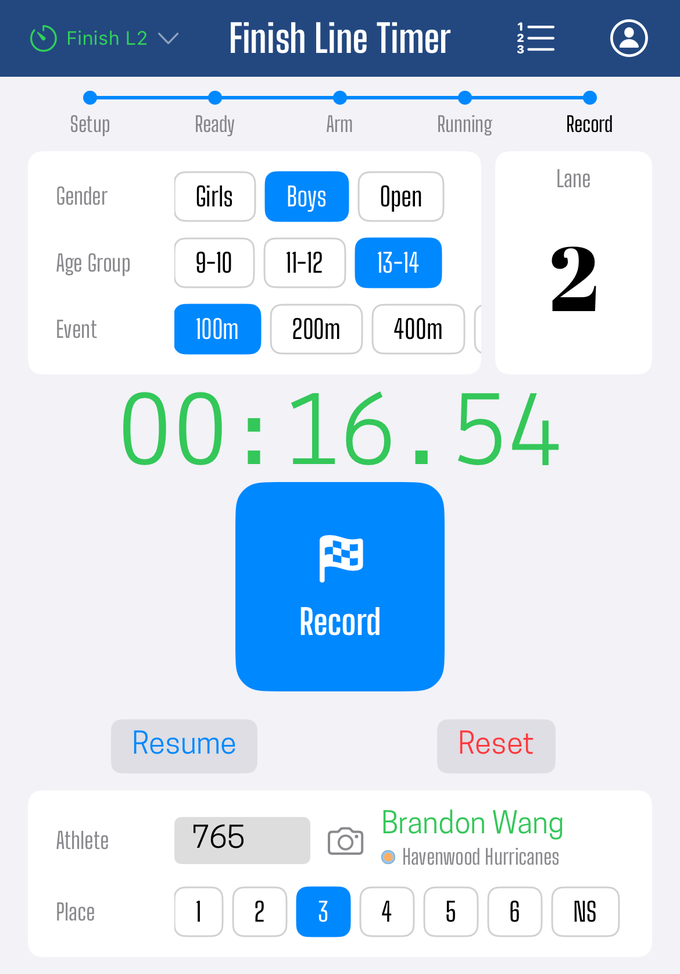
- The heat arrives. When the starting line sends the heat out, your screen fills in with its event, gender, age group, and the bib assigned to your lane. Nothing to type.
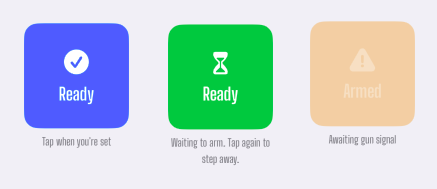
- Tap Ready. This tells the crew your lane is covered. You can withdraw it while the heat is still being staged; once the heat is armed you cannot, and the button turns orange to say so.
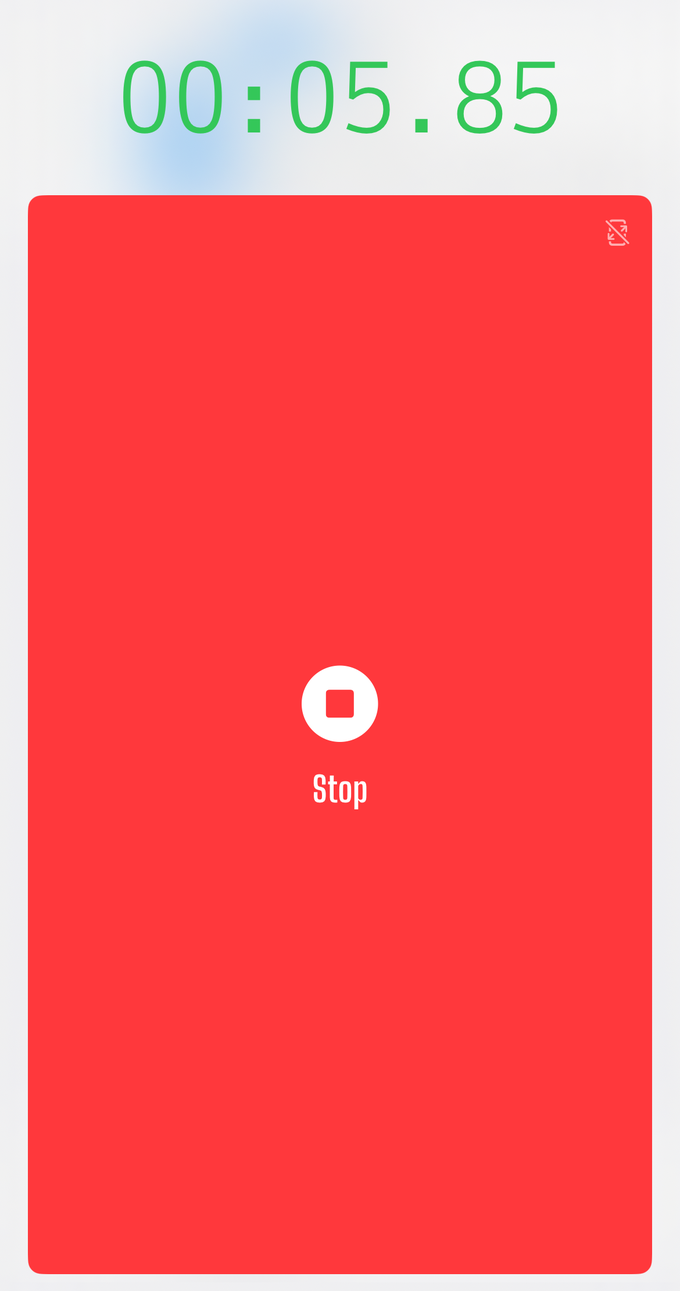
- The gun fires. A stopwatch appears and starts counting from the shared start time, not from when your screen updated.
- Tap Stop as your runner crosses. The big red button, or the volume down button on the side of the device.
- Set the place, check the bib, then Record. A confirmation shows the lane, the bib, the place, and the official time. Confirm and it goes out to the crew.
The screen then resets for the next heat.
Hold it like a stopwatch
The volume buttons exist to make the phone behave like the thing you already know how to use.
Think about how a handheld stopwatch is actually operated. It sits in your palm, your thumb rests on the plunger before the runners come into view, and you never once look at it. Your eyes stay on the line. When the torso crosses, your thumb is already there and it just goes down. The whole interaction is muscle memory, and that is precisely why it is accurate.
A touchscreen takes that away. Glass has no landmarks. To hit a button on a screen you either glance down at the exact moment you can least afford to, or you tap approximately and hope you found it. Both are worse, and both are worse in a way that varies from heat to heat.
The volume down button restores the plunger: it starts and stops the clock the way a plunger does. Volume up is the reset, and it only works once the clock is stopped, so a stray press during a heat cannot take a time away from you. So work the phone the same way you would work a stopwatch:
- Grip it before the field arrives, with your thumb resting on the volume down key, not hovering near it. A pre-loaded thumb is the entire trick.
- Watch the line, not the phone. The stopwatch on screen is there to confirm afterward, not to read during.
- Press as the torso crosses the plane, not the lead foot and not the lean. Torso is what the result is measured on.
- Use the same grip and the same hand every heat. Consistency of habit becomes consistency of times.
Why this carries so much weight: your reaction is the single largest error left in a hand-timed finish, and a pre-loaded thumb does not just make you faster, it makes you consistent. A delay that is the same every heat is a small, predictable amount everyone shares. A delay that swings depending on whether you found the button is what puts daylight between two athletes who actually finished together.
The screen tap is still there, and it works. It is the fallback, not the technique.
Recording the place
Place is not worked out from the times in a hand-timed lane heat. You record it, as a separate choice, when you record the result.
Here is why. On a lane-timed heat the places are called by the finish-line judge, who is watching the whole line with their eyes on the plane. At that moment you are writing down an official's call, not working out a result from your own stopwatch.
Pick from the row of place buttons, one per lane, or type a number in the field if the place is higher than your lane count, which happens when the field is wider than the buttons allow.
The place you record stands, even when the clock disagrees. If the judge called your runner second and the times would sort them third, they stay second. Nothing re-sorts a recorded place to match the stopwatch on its own. Hand-captured times all carry a bit of human reaction; a judge standing on the line watching the plane does not, and on a close finish the judge is the better call. The record keeper can still override this deliberately, as described below.
NS, for anything that does not score
The last button is NS, non-scoring. Use it when a result should not take a place: an exhibition runner, an unattached athlete in a scored league heat, or a heat that simply is not being placed.
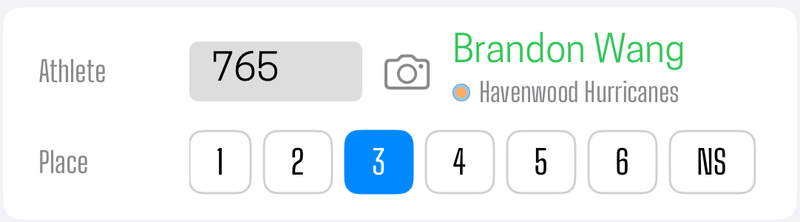
Leaving the place empty also reads as NS, and that is a perfectly good thing to do. If the judge's call has not reached you yet, record the time with no place rather than guessing, and it will sit as NS waiting to be sorted out. Never hold a result back because you are unsure of the place. The time is the part that cannot be recovered later.
If the whole heat is non-scoring, that is usually already marked on the heat sheet with the Scoring heat toggle when the heat was planned, so it is visible to everyone before the race rather than being rediscovered per lane at the finish.
The record keeper can overrule you
Nothing here is final. The record keeper has two ways to change what you recorded, and the difference between them is worth knowing.
Editing one place. There is a place control on every result, so a single lane can be reassigned after the heat. This is where a contested finish or a late correction from the judge gets settled.
Re-ranking the whole heat by time. There is also an Auto place action on a lane heat that re-sorts its places by finish time, earliest first. It is a deliberate call the record keeper makes, never something that happens on its own, and it leaves some rows alone on purpose: only scoring finishers with a captured time are ranked, while NS results, DNS and DNF, and any lane with no time keep the place they had.

That action exists for when the recorded places are the less trustworthy of the two: nobody was watching the line, the judge's card never arrived, or the places were written down differently from lane to lane. In that situation sorting on the clock beats keeping guesses.
Both directions are there on purpose, because which one is more reliable genuinely depends on the meet. That call is not yours to make from lane 3. Record what you were told, promptly, and let the record keeper decide afterward which to trust. A wrong place is a thirty-second fix later; a missing time is not recoverable at all.
Where this does not apply
Place is only a manual step for hand-timed lane heats. Two positions work it out for you instead:
- Pack heats rank by the order runners cross, so the timer's taps have already set the places.
- Photo finish ranks lane results by the finish times read off the strip, which are exact enough to rank on.
What your device is actually doing
Your device works out the official time itself: the moment you tapped, measured from the gun. Both are on the same shared clock, so that measurement holds even though the gun went off on a different phone a hundred meters away. See how clock sync works.
What you send is a finished result, not a number for someone else to piece together later. That is why the bib confirmation matters: it is the last moment where fixing the athlete is easy.
Things that will happen
You need to see the heat details while it is running. Dismiss the running overlay with the ⊠. The stopwatch keeps running and the main button becomes Stop.
Your runner swapped lanes, or the bib is wrong. Correct it on the confirmation before you record. If you are not sure of the number, record it anyway and let the record keeper resolve it, or photograph the bib so there is evidence to work from later.
You captured but have not recorded yet, and the next heat is announced. Your screen stays on the heat you are holding. It will not be pulled out from under you mid-confirmation. The new heat waits until you record.
You joined late, or the heat is already running. You are shown the heat and must tap Ready to join it. This is deliberate: an unmanned lane should look unmanned rather than silently appearing covered.
You lost signal. Your time is saved to your own device before anything is sent. It is safe, and it goes out when the connection returns. Do not stop timing because a status indicator looks unhappy.
You closed the app, or it crashed, mid-heat. Reopening restores where you were, including a captured time you had not yet recorded.
What this position does not do
- It does not judge places. You record the place the finish-line judge called. Deciding a contested finish belongs to the judge, the photo-finish strip, and the record keeper.
- It does not need the roster. Your lane's athlete is sent to you.
- It does not hold up the start. Tapping Ready tells the crew your lane is covered, but it never blocks anything. A heat can be armed and fired whether or not you tapped Ready, so if the gun goes while you are not ready, just capture.
If you are short on people
A per-lane crew is the traditional shape, not the only one. One photo-finish device photographs the entire line and replaces every lane timer at once, which for a short-staffed meet trades six volunteers for one operator and a bib collector. See how many devices do I need.
Did this answer your question? If something here is wrong, missing, or out of date, tell us at support@finishlinetimer.com and we’ll fix it.