
A heat sheet is the plan for the meet: which heats run, in what order, and who is in each lane. With one in place, the starting line stages each heat with a single tap instead of retyping the event, gender, age group, and every bib.
You do not need a heat sheet to run a meet. The starting line can set up each heat by hand as you go. A sheet is what turns that from typing into confirming.
Two ways to get one
Import it if your meet is seeded in meet-management software. This is the fast path for a meet that already has a program.
Build it by hand if you seed informally, or if you only want a plan for part of the meet. This is the common case for youth leagues and dual meets.
Both land in the same place: Meet Setup → Heat Sheet.
Importing a sheet
- Open the meet, then tap Heat Sheet.
- Choose Import.
- Select the event and athlete files your meet software exported. Both are taken in one pass.
- Review the import summary.
The importer flags problems one entry at a time rather than refusing the whole file. A sheet with three entries it cannot read imports the rest and tells you exactly which three, so a small formatting quirk never costs you the whole program.
A file that will not import? Send it to support@finishlinetimer.com. Export formats vary between versions and vendors, and a real file is what lets us support it properly.
Building a sheet by hand
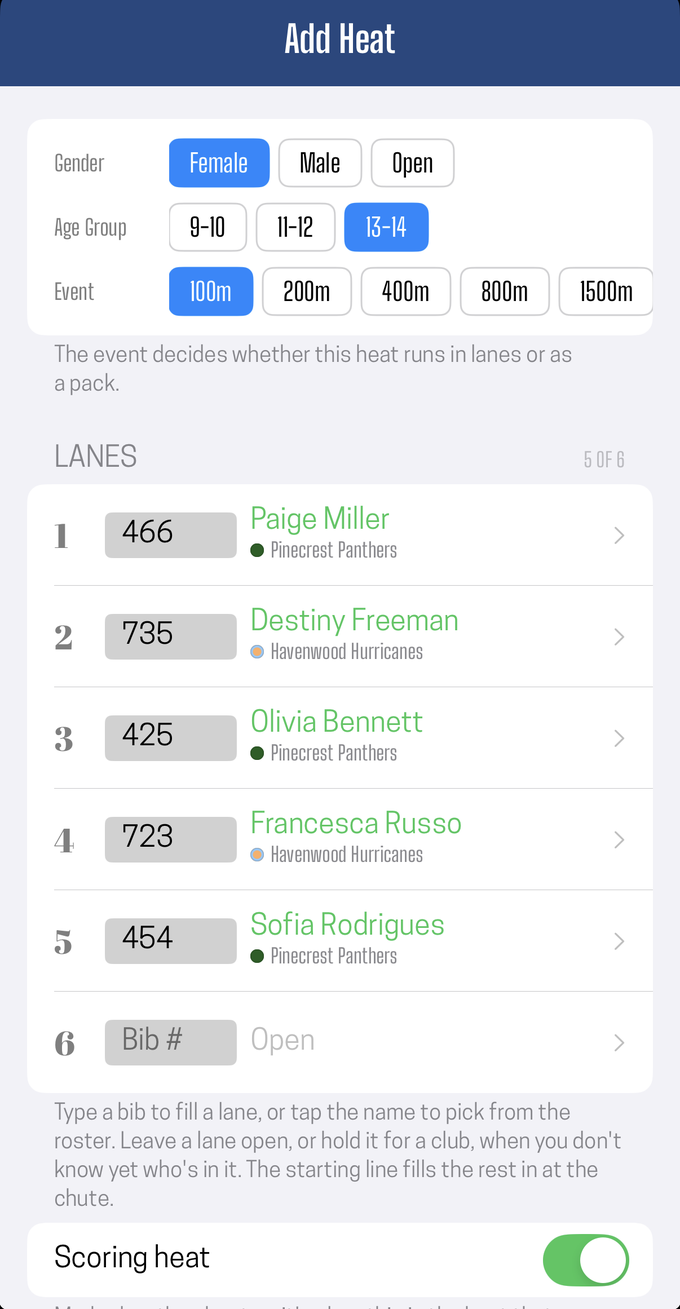
From an empty sheet, choose Build One by Hand; on an existing sheet, use Add a Heat. You build one heat at a time:
- Set the classification — event, gender, and age group, using the same picker the starting line uses.
- Fill the lanes. Each lane is one of three things:
- An athlete, entered by bib on the numeric keypad. The bib is matched against your roster as you type, and a duplicate within the heat turns red.
- Held for a club, when you know a visiting team has that lane but not who is in it.
- Open, when nothing is assigned.
- Turn on "Scoring heat" if this heat's places count toward the league standings. Marking it on the sheet means the finish crew knows before the race, rather than working it out lane by lane afterward.
- Save.
Tap any heat that has not been run to edit it.
Open lanes and short heats
A lane does not have to be filled to be planned. A held lane displays with a dash and the club's name, and a short heat says so plainly, for example "5 of 6 lanes".
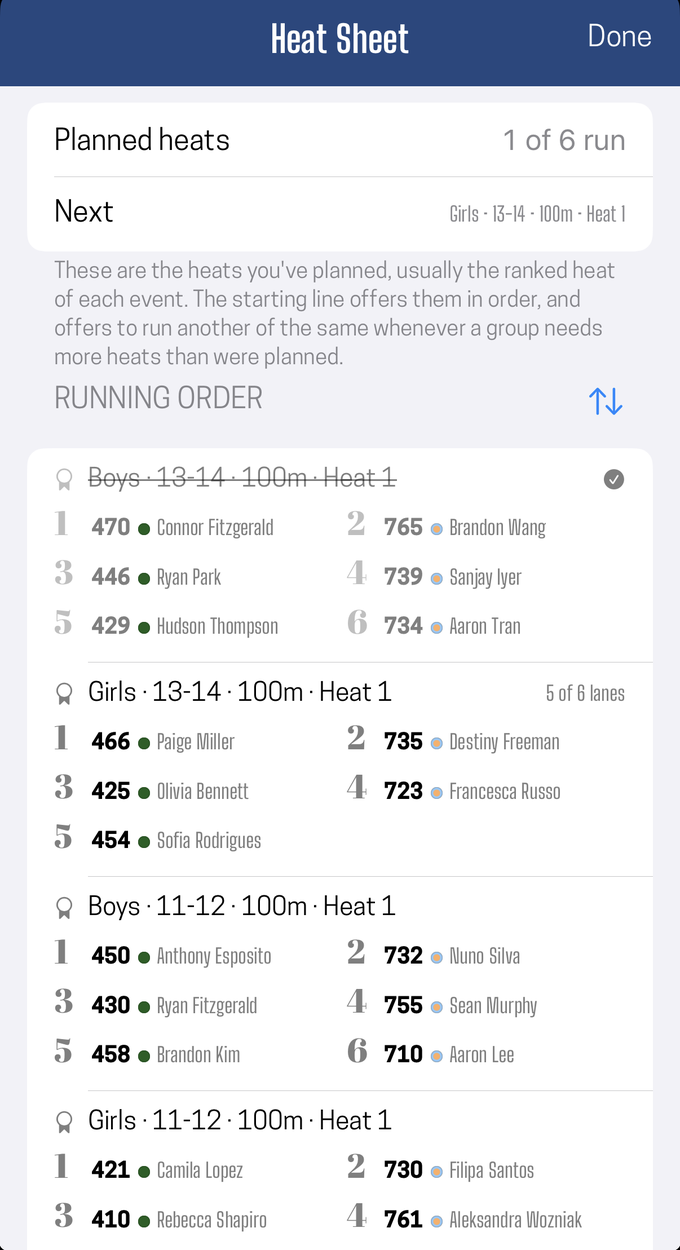
That is what makes an unpredictable field workable: a visiting team that shows up with three runners you have never seen can still be planned for, and the starting line will not treat their empty lanes as a mistake.
The starting line also keeps a heat that is wider than your track's usual lane count, so an imported eight-lane program does not get quietly cut down to six.
Full schedule or partial sheet
The Coverage setting is the one control that says what your sheet claims to be:
| Coverage | Means | What to expect |
|---|---|---|
| The whole meet | Every heat the meet will run is on the sheet | The sheet is the program, and its heat count is the whole meet |
| Just the planned heats | Only the heats you laid out ahead of time | More heats get added at the chute as they are needed |
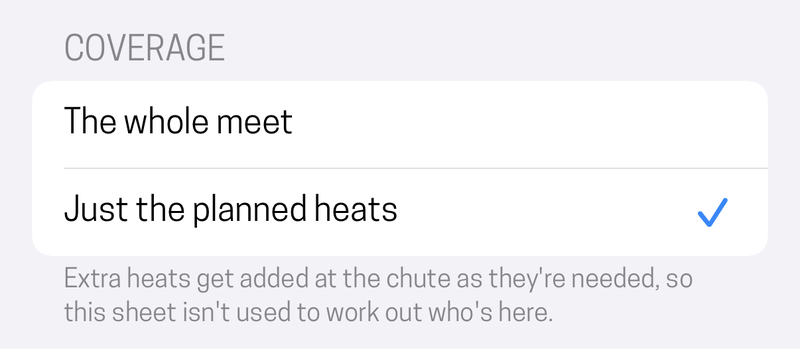
An imported program lands on The whole meet, because that is what meet software exports. A sheet you build by hand starts on Just the planned heats, because a hand-built sheet is usually a head start rather than a full program. Either can be changed on the sheet screen.
Setting it accurately matters for one practical reason: it is what the meet's summary line describes. A sheet marked as the whole meet reports "42 heats" as everything that will run, so a partial sheet labeled that way tells everyone the meet is shorter than it is.
Using the sheet at the meet
At the starting line, Next on the heat sheet appears above the heat setup form. Tap it and the form fills in: the event, gender and age group, the lane assignments, who is in them, and, for a pack heat, the expected field size.
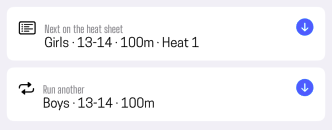
Nothing else changes. Every field remains editable, so a last-minute scratch or a lane swap is the same edit it would have been without a sheet.
Two conveniences sit alongside it:
- Run another repeats the classification of the heat you just staged, useful for running heat after heat of the same event with no sheet at all.
- Once a heat is staged, it is marked run on every device holding the sheet, not just the one that staged it. Whoever stages the next heat sees the correct next one.
What a heat sheet does not do
- It does not seed. FinishLine does not generate heats from marks or performance history. Bring a seeded program from your meet software, or decide the lanes yourself.
- It does not replace your roster. Athletes still come from your roster in Setup; the sheet just points at them.
- It is not a schedule with times. It is an order of heats, not a timetable.
Did this answer your question? If something here is wrong, missing, or out of date, tell us at support@finishlinetimer.com and we’ll fix it.